
Introduction
Too many B2B SaaS founders invest in automation tools expecting pipeline to materialize—only to discover they've automated noise instead of revenue. The gap between automating tasks and actually accelerating deals is where most seed-to-Series-A teams stumble. You implement sequences, scoring models, and enrichment tools, but deals still stall, reps still drown in admin work, and conversion rates refuse to budge.
Sales reps spend only 40% of their time actually selling. The other 60% disappears into creating quotes, prospecting, planning, and manual data entry. That's not a productivity problem—it's a process design problem. Automation done right reclaims that lost time.
This guide is for seed-to-Series-A B2B SaaS teams trying to scale sales without proportionally scaling headcount. You'll find actionable best practices for identifying what to automate, what to leave human, and how to measure whether your automation actually works.
Key Takeaways
- Focus automation on lead enrichment, follow-up sequences, CRM updates, and scheduling: repetitive tasks that don't require judgment
- Audit your workflow first: identify the top two bottlenecks consuming 80% of rep time before automating anything
- Discovery calls, objection handling, and enterprise account outreach require human sellers; automation in these areas creates friction, not efficiency
- Track pipeline velocity, response time, and meetings booked with qualified leads—not just activity volume
- Experienced sellers—fractional or full-time—are still essential to optimize and run these tools well
What to Automate: Key Areas of Your B2B SaaS Sales Process
Lead Generation and Enrichment
Your reps shouldn't spend 11+ hours weekly researching prospects. Lead enrichment automation identifies high-fit prospects based on ICP signals—firmographics, intent data, job changes, funding announcements—and auto-populates CRM records with accurate contact details, company size, tech stack, and recent trigger events.
B2B contact data decays at approximately 2.1% per month, meaning over 22% of your CRM becomes outdated annually. Manual research can't keep pace. Automated enrichment tools maintain data accuracy and free reps to focus on outreach rather than hunting for email addresses.
Prioritize tools that cover:
- Intent signal tracking (website visits, content downloads, competitor research)
- Firmographic filtering aligned to your ICP (company size, revenue, industry)
- Real-time job change alerts for warm outreach triggers
- Automatic CRM record updates to eliminate manual data entry
Outbound Sequencing
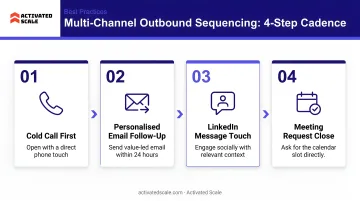
Multi-step, multi-channel cadences—email, LinkedIn, phone reminders—work best when triggered by prospect behavior rather than arbitrary time delays. If a prospect opens three emails but doesn't reply, the sequence adapts. If they click a case study link, the next touchpoint references that content.
The data backs this up: multi-channel outreach boosts engagement by 287% versus single-channel approaches. Cold email alone yields 0.8–2.0% meeting conversion; well-designed multi-touch sequences deliver 4.0–7.0%.
Sequencing best practices:
- Use conditional logic: if prospect replies, exit sequence; if they click pricing, route to AE
- Layer channels strategically: email first, LinkedIn connection after open, call after multiple touchpoints
- Personalize at scale with dynamic fields (industry pain point, recent company news, mutual connection)
- Test cadence length—top performers run 7-9 touchpoints over 14-21 days
CRM Hygiene Automation
Auto-logging call activity, updating deal stages based on engagement signals, and syncing contact data across tools. When this is manual, forecast accuracy collapses. Only 20% of sales organizations forecast within 5% of projections; 43% miss by 10% or more.
Poor CRM data costs the average organization $12.9 million annually. Sales reps waste 27% of their time—546 hours per year—dealing with inaccurate records. Automating CRM hygiene cuts that loss directly.
Specifically, automate:
- Call and email activity logging from sales engagement platforms
- Deal stage progression triggered by specific actions (demo completed, proposal sent, contract signed)
- Duplicate record detection and merging
- Field validation rules to prevent incomplete or incorrect data entry
Meeting Scheduling and Follow-Up
Calendar tools eliminate back-and-forth scheduling, and automated post-call summaries create next-step tasks without manual effort. Both keep deals moving without delay.
After every discovery call, automation can:
- Send a recap email with key discussion points
- Create a follow-up task for the rep (send case study, schedule demo, loop in technical team)
- Update CRM fields (deal stage, budget confirmed, decision timeline)
- Trigger the next sequence step if the prospect doesn't respond
Speed matters here. Conversion rates are 8x higher when leads are engaged in the first 5 minutes. Yet only 0.1% of inbound leads get contacted that fast. Automated routing and scheduling close that gap.
Lead Scoring and Routing
AI-driven models score leads on fit (does this prospect match our ICP?) and intent (are they actively researching solutions?), then route them to the right rep or sequence. A high-fit, high-intent lead goes straight to your best AE. A low-fit inquiry enters a nurture sequence.
One thing most teams get wrong: scoring criteria built from generic templates rather than your actual closed-won data. If your best customers are Series A fintech startups with 20–50 employees, those attributes should carry the most weight in your model.
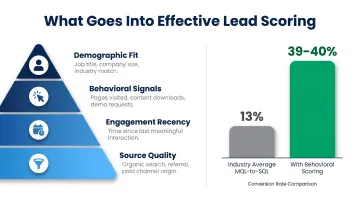
Effective lead scoring includes:
- Demographic fit: company size, industry, revenue, tech stack
- Behavioral signals: page views, content downloads, demo requests, pricing page visits
- Engagement recency: active in last 7 days vs. dormant for 90 days
- Source quality: inbound referral vs. cold list upload
MQL-to-SQL conversion averages 13% across industries, but B2B SaaS companies with behavioral lead scoring achieve 39–40%. Better inputs produce better pipeline—and better pipeline closes faster.
Best Practices for Automating B2B SaaS Sales
Audit Before You Automate
Map your current sales workflow for one full week. Track every task: prospecting, data entry, email writing, CRM updates, meeting prep, follow-up. Identify which activities are repetitive, error-prone, or time-consuming.
Apply the 80/20 rule: which 20% of manual work consumes 80% of rep time? Automate that first.
Skipping this audit means automating broken processes at scale. If your messaging doesn't resonate, you're just sending bad emails faster. And if your ICP isn't validated, automated lead scoring floods your pipeline with junk. Validate manually before you scale.
Keep Your ICP Tightly Defined Before Automating Outreach
Automation amplifies both good targeting and bad targeting equally. If your ideal customer profile is vague ("B2B companies that need our solution"), automated sequences will flood your pipeline with low-fit leads who ghost after the first call.
Before you build sequences, document:
- Company size (employees and revenue range)
- Industry and vertical
- Buyer persona (title, department, seniority)
- Tech stack or existing tools
- Pain points your product solves
- Buying triggers (funding, leadership change, competitor churn)
The tighter your ICP, the higher your reply rates. Top-performing cold email campaigns achieve 10.7%+ replies because they target precisely and personalize based on real fit signals.
Build for Personalization at Scale, Not Spray-and-Pray
Conditional logic is what separates effective automation from generic blasts. Structure sequences so messaging adapts to prospect behavior based on dynamic fields — industry, pain point, recent trigger event.
Example:
- Prospect opens email 1 but doesn't reply → Send email 2 with case study specific to their industry
- Prospect clicks case study link → Send email 3 referencing that case study and offering a demo
- Prospect doesn't open email 1 → Wait 3 days, send from different angle or channel (LinkedIn message)
Use merge tags thoughtfully. Avoid lazy tokens like "Hi {{First_Name}}, I noticed {{Company}} is in {{Industry}}." Instead, write something like: "Hi Sarah, I saw Acme Corp recently expanded into the UK — companies scaling internationally often struggle with fragmented sales handoffs. Here's how we helped a fintech firm solve that in 60 days."
That's the standard to aim for: automated delivery, but a message that reads like it was written for one person.
Integrate Your Tools Before Launching Automations
Ensure your CRM, sequencing tool, calendar software, and enrichment data sync cleanly before activating workflows. Broken integrations create data inconsistencies that compound over time and corrupt pipeline reporting.
Pre-launch integration checklist:
- CRM fields map correctly to enrichment tool fields
- Sequence platform writes activity back to CRM
- Calendar tool updates CRM when meetings are booked
- Lead scoring model pulls data from all sources (website, email, CRM)
- Unsubscribes and opt-outs sync across all platforms
Test with a small batch first. Send 10 sequences, book 2 meetings, close 1 deal — then verify every data point landed where it should in your CRM.
Test in a Sandbox, Then Monitor the First 48 Hours Live
Run workflows through a sandbox environment. Stress-test edge cases: What happens if a prospect replies to email 3? What if they book a meeting but cancel? What if their company changes names mid-sequence?
Most workflow failures surface within the first 48 hours of going live. Monitor closely:
- Are emails sending at the right time?
- Are replies triggering sequence exits?
- Are meetings booking correctly?
- Are CRM fields updating?
- Are reps receiving the right notifications?
Assign someone to own this monitoring — don't assume it's working.
Build Human Checkpoints into Automated Workflows
The best automation designs include strategic pause points where a rep reviews or personalizes before a sequence continues. This is especially important before moving to a new channel (email to phone call) or escalating outreach intensity (generic touchpoint to direct ask).
Example checkpoint workflow:
- Automated email sequence (3 touchpoints over 7 days)
- Pause: Rep reviews engagement data and adds personalized note
- LinkedIn connection request (automated send, manual message)
- Pause: Rep decides whether to attempt phone call based on engagement
- Phone call with automated reminder and post-call task creation
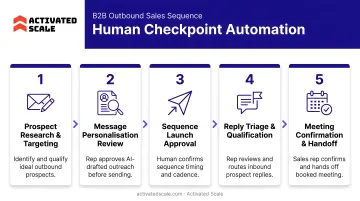
Human checkpoints prevent tone-deaf outreach and ensure high-value prospects get appropriate attention.
What NOT to Automate: Where Human Sellers Still Win
Discovery and Needs Assessment
The quality of information gathered in early discovery calls determines whether your solution will resonate. AI can prep you with company background, but the questions, follow-up probes, and active listening require a skilled human.
This is where deals are won or lost before the demo. If you automate discovery ("Click here to answer these 10 questions about your needs"), you'll miss the nuances:
- The political dynamics between decision-makers
- The unspoken pain points the prospect hesitates to mention
- The budget constraints they're navigating
- The timeline pressure driving urgency
61% of B2B buyers prefer a rep-free experience overall, but they still want human sellers for tasks requiring "contextual intelligence"—specifically, determining whether a product fits their company's specific needs. Automate the scheduling, but not the conversation.
Late-Stage Negotiation and Objection Handling
Automating responses to complex objections or pricing pushback creates friction rather than reducing it. Buyers at this stage need to feel they're engaging with a credible expert who understands their specific situation, not receiving a templated reply.
When a prospect says "Your competitor is 20% cheaper," the right response depends on context:
- Are they bluffing?
- Is the competitor actually comparable?
- What features matter most to this buyer?
- Is price the real objection, or is it a proxy for risk?
A human seller reads tone, asks clarifying questions, and adapts the response in real time. An automated workflow can't.
Relationship-Based Outreach to High-Value Accounts
For enterprise-tier or strategic accounts, personalized outreach from a human seller—referencing specific context about their business, recent news, or shared connections—consistently outperforms any automated sequence.
If you're targeting a $200K ARR deal with a Fortune 500 company, don't run them through the same 7-email sequence as a $10K SMB prospect. That deal requires a different approach entirely:
- Research the account and its current strategic priorities
- Identify multiple stakeholders across buying roles
- Craft custom messaging for each contact
- Coordinate multi-threaded outreach across channels
Automation should support this work (alerting you to trigger events, enriching account data, scheduling meetings), but it shouldn't replace the strategic thinking and relationship-building required to win.
That judgment gap is where many early-stage SaaS companies struggle. For seed-to-Series-A startups, fractional sales talent from Activated Scale gives founders access to experienced AEs and SDRs who handle discovery, negotiation, and strategic account outreach — while automation takes care of the repetitive work.
Common Sales Automation Mistakes to Avoid
Over-Automating Too Early
If you haven't confirmed what messaging, channel, and sequence structure actually convert, automation just runs bad processes faster. 74% of high-growth startups fail due to premature scaling, and 93% of startups that scale prematurely never break $100K revenue per month.
Validate before you scale:
- Run 50 cold emails manually and track reply rate
- Conduct 20 discovery calls and document objections
- Close 5 deals and analyze what messaging worked at each stage
- Then automate the proven process
Starting with automation before you have a repeatable, validated sales motion wastes time and money. Despite widespread AI tool adoption, 75% of sales teams report their sales cycles are the same length or longer—the tools didn't fix broken processes, they accelerated them.
Neglecting Data Hygiene
Automation breaks down when the underlying CRM data is incomplete or inaccurate. Wrong job titles, outdated emails, missing company data—every workflow that touches bad data will produce bad results.
Before automating:
- Deduplicate CRM records
- Standardize field formats (company name, industry, deal stage)
- Validate email addresses and phone numbers
- Enrich missing data (company size, revenue, tech stack)
- Set validation rules to prevent future data decay
Skipping this step means your sequences reach the wrong people with the wrong context—and no amount of automation fixes that.
Measuring Activity Instead of Outcomes
Tracking emails sent or calls logged rather than pipeline generated, meetings booked with qualified prospects, or deals advanced creates the illusion of progress while hiding inefficiency.
Activity metrics (vanity):
- 500 emails sent this week
- 100 calls logged
- 50 LinkedIn connection requests
Outcome metrics (real):
- 15 meetings booked with qualified leads
- 8 SQLs moved to discovery stage
- 3 deals advanced to proposal
- $75K pipeline created
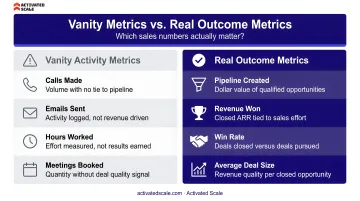
If your automation dashboard only shows volume, you're optimizing for the wrong thing. Tie every sequence and workflow to a pipeline outcome, then review it weekly.
How to Know If Your Sales Automation Is Working
Establish Baseline Metrics Before Launch
Before launching automation, record current benchmarks:
- Lead response time: How long until first contact with inbound leads?
- Sales cycle length: Days from SQL to closed-won?
- Meetings booked per rep per week: How many qualified meetings does each rep hold?
- Pipeline conversion rates: MQL-to-SQL, SQL-to-opportunity, opportunity-to-closed?
These baselines make it possible to attribute improvement (or decline) to specific automations.
Track Key Metrics Post-Implementation
Once your baselines are set, monitor these metrics at 30, 60, and 90 days post-launch to see what's actually moving.
| Metric | Industry Benchmark | Expected Gain with Automation |
|---|---|---|
| Lead response time | 42-hour average; only 7% of companies respond within 5 minutes | Sub-10-minute response → 3–8x conversion lift |
| MQL-to-SQL conversion | 13% industry average | Behavioral lead scoring pushes B2B SaaS to 39–40% within 60 days |
| Meetings booked per rep | 15–21/month (SDR benchmark); top performers hit 18+ | 10+ hours saved per rep/week → 20–40% volume increase |
| Sales cycle length | SMB: 30–90 days; mid-market: 60–120; enterprise: 180+ | 10–20% reduction by eliminating follow-up and scheduling delays |
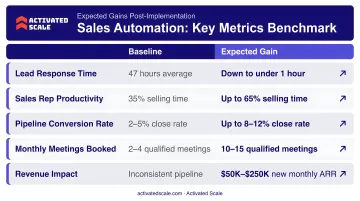
Maintain an Iteration Mindset
Automation is never "set and forget." Review sequence performance every two weeks:
- Open rates: Are subject lines working?
- Reply rates: Is messaging resonating?
- Meeting conversion: Are qualified prospects booking time?
- Drop-off points: Where are prospects exiting the sequence?
Use this data to refine subject lines, cadence timing, and channel mix. Numbers tell you what is breaking; your reps tell you why. The SDR or AE closest to the customer often spots friction before the data does — ask them where prospects push back and where they engage best.
Frequently Asked Questions
What are the 5 C's of sales?
The 5 C's framework includes Confidence, Connection, Curiosity, Competence, and Commitment. Automation supports each stage—building confidence through data insights, enabling connection via timely follow-up, keeping CRM records accurate—but human judgment drives execution at every step.
What are the 4 stages of process automation?
The standard four-stage framework is: Discover (identify what to automate), Design (map workflows and logic), Deploy (implement and test), and Optimize (refine based on results). For B2B SaaS teams, start with a workflow audit before building any sequences.
What parts of B2B SaaS sales should NOT be automated?
Discovery calls, late-stage negotiations, complex objection handling, and high-value account outreach require human judgment and relationship skills. Buyers want self-service for information gathering but value human sellers when assessing fit, navigating objections, and making final decisions.
What is the best first step for a startup automating its sales process?
Audit your workflow to find the single biggest time drain—usually manual data entry, follow-up scheduling, or lead research—and automate that one process first. Validate it works and improves outcomes before adding more complexity.
How do you balance automation with personalization in B2B outreach?
Use dynamic fields, behavioral triggers, and conditional logic to make automated sequences feel relevant—reference the prospect's industry, recent company news, or engagement behavior. Reserve fully manual outreach for strategic accounts where relationship-building and custom messaging deliver disproportionate ROI.
How do you measure ROI from sales automation?
Track pipeline velocity, meetings booked per rep, sales cycle length, and time spent selling vs. admin tasks—measured against pre-automation baselines. For example, if automation reclaims 10 hours per rep weekly and produces 5 more qualified meetings per month, weigh that revenue impact against your tool costs.