_edi.png)
Forecast meetings rely on Customer Relationship Management (CRM) reports that sales teams do not fully trust. That's why reps delay activity logging after calls, and deal stages stay unchanged for days.
So leaders face a recurring operational problem, and revenue visibility breaks when CRM discipline slips. Poor CRM data quality costs organizations an average of $12.9 million annually.
If your organization feels the consequences during pipeline reviews, such as stalled revenue, to fix that, you don't need more reps. What you need is to start looking at automation.
To solve the problem, this blog explains CRM automation, how automated workflows operate, and how you can remove operational friction from your system.
Key Insights
- CRM automation removes repetitive administrative work from sales processes, improving productivity.
- The financial impact of poor CRM data quality can exceed $12.9 million per year for the average organization.
- Contacting a lead within the first five minutes of their inquiry makes them 21 times more likely to enter the sales pipeline than those who wait just half an hour.
- Nearly half of all business leaders (42%) feel their data strategy is out of sync with what the organization is trying to achieve.
- Revenue leaders gain stronger pipeline visibility and forecasting accuracy through automated CRM processes.
What is CRM Automation?
CRM automation refers to the use of software workflows that automatically perform repetitive tasks inside a customer relationship management system. These workflows trigger actions when predefined conditions occur, reducing manual work across sales processes.
Common automated actions include:
- Assigning leads to the correct sales representative
- Creating follow-up reminders after meetings
- Updating opportunity stages based on activity
- Sending automated email sequences to prospects
Every lead receives the same routing rules, and CRM records update automatically after key events. But what business outcomes does automation actually create for the sales organization?
Most importantly, why do many revenue teams now prioritize automation investments in 2026?
Also Read: 5 Key Steps to Recruit the Sales Executives You Need
5 Benefits of Using CRM Automation
Data entry is a drain on your team’s potential. When your sales reps spend more time logging calls and updating spreadsheets than actually selling, your revenue suffers.
.jpg)
By eliminating the busywork, automation frees your team to focus on what they do best: Building relationships. Here are five ways CRM automation can boost your productivity:
1. Increased Productivity
Sales representatives perform dozens of repetitive CRM tasks each day. Activity logging, follow-up reminders, and contact updates consume large portions of the workday.
Automation removes these repetitive tasks from daily workflows.
2. Faster Follow Ups
Leads contacted within five minutes are 21 times more likely to convert into opportunities compared to waiting 30 minutes.
Delayed responses reduce engagement and weaken buying momentum. These schedules follow-up actions immediately after meetings, form submissions, or product demonstrations.
3. Improved Data Accuracy
Manual CRM updates create incomplete records. Reps forget to log calls.
Automation updates CRM records automatically after defined events. Sales leaders receive cleaner data during pipeline reviews and forecasting discussions.
4. Better Customer Engagement
Buyers expect a consistent customer relationship during the sales process. Irregular outreach damages trust and slows deal progression.
Automation triggers communication workflows based on prospect activity. Prospects receive timely emails, meeting confirmations, and follow-ups.
5. Improved Pipeline Visibility
Sales leaders depend on CRM reports for forecasting decisions. Poor data quality weakens those reports. Automation in CRM records activities, updates opportunities, and captures interactions across the sales process.
Operational friction inside the revenue system often slows execution. Hired reps from Activated Scale's Fractional Sales Leadership service help to design scalable CRM workflows and build reliable forecasting systems.
For revenue leaders, the value proposition of CRM automation is clear. The practical question, however, lies in the execution: How do these workflows function on a technical level?
How Does CRM Automation Work?
CRM automation sounds like a complex concept, but at its core, it runs on a simple principle: 'When this happens, do that.' By connecting these triggers to specific actions, a CRM transforms from a simple address book into a proactive assistant.
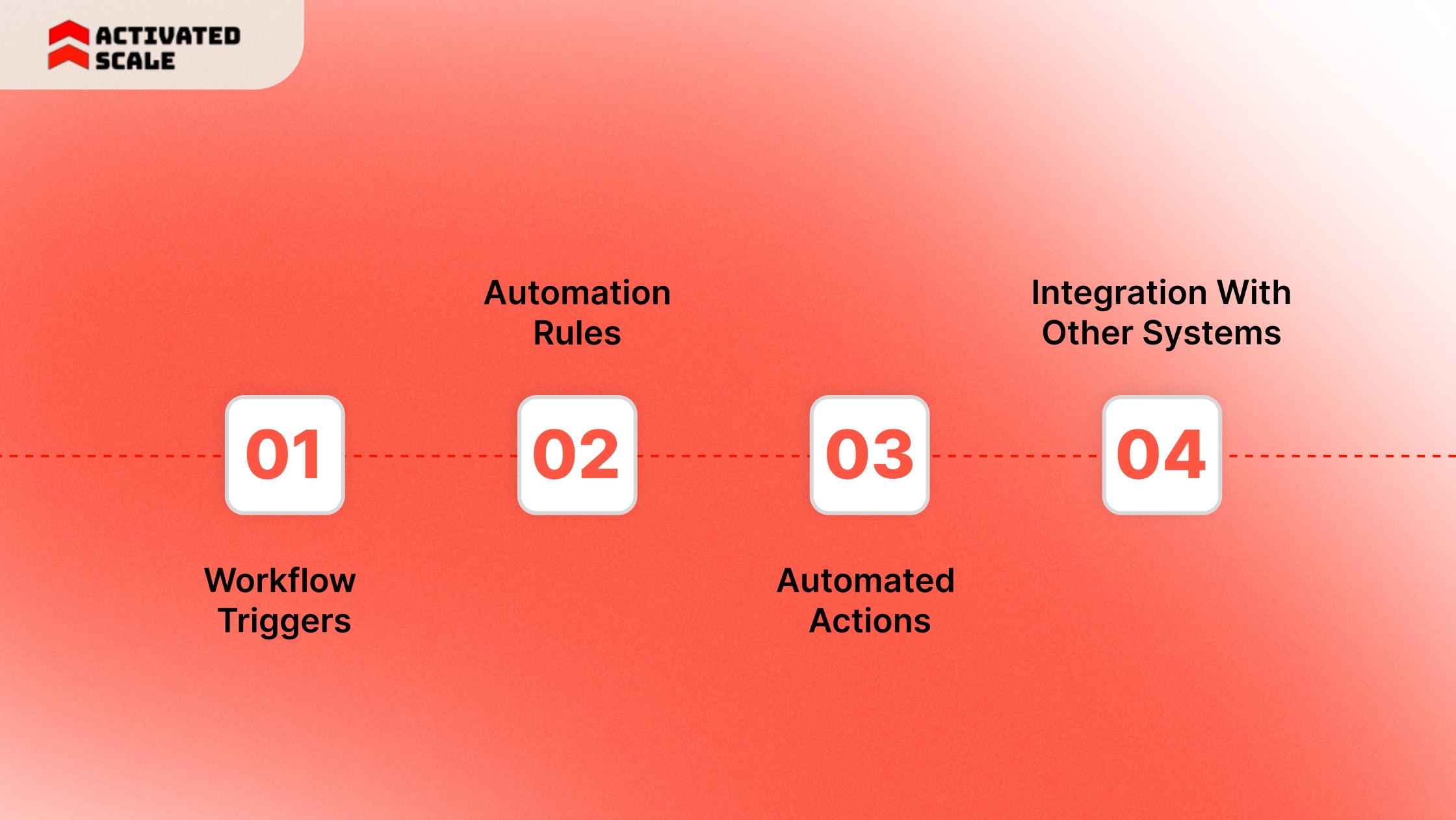
Let’s explore the basic mechanics of how CRM automation works to organize your daily tasks:
1. Workflow Triggers
Triggers start automation workflows. A trigger occurs when a defined event appears inside the CRM system.
Examples include:
- A new lead enters the CRM
- A prospect submits a website form
- A deal stage changes inside the pipeline
- A meeting activity gets logged
These events signal the CRM to start a workflow.
2. Automation Rules
Automation rules define the conditions for workflow execution. Rules determine when the CRM should run an automated process.
Examples include:
- Assigning leads based on territory
- Triggering follow-up emails after demos
- Creating reminders after sales calls
These rules standardize pipeline execution across the sales organization.
3. Automated Actions
Actions represent the tasks the CRM performs after a trigger occurs. Common automated actions include:
- Assigning new leads to sales representatives
- Sending automated follow-up emails
- Updating opportunity stages in the pipeline
- Creating reminders for sales tasks
These automated tasks remove repetitive work from daily sales activity.
4. Integration With Other Systems
Modern CRM environments connect with multiple business systems. External tools continuously send data into the CRM. Common integrations include:
- Website forms capturing inbound leads
- Email platforms recording conversations
- Marketing automation tools tracking engagement
- Support systems logging customer issues
Automation workflows move this external data into the CRM automatically.
For example, a website form submission creates a new contact record instantly. The CRM can then assign the lead, schedule follow-ups, and notify the correct sales representative.
When discussing CRM automation in practice, a few platforms consistently dominate the conversation due to their workflow engines and market penetration.
But what are those, and how do you find out the features you need to look for?
Also Read: Using AI Tools for Effective Lead Generation
Best Features of CRM Automation and Tools Used by Successful Teams
Ranking blogs and industry reviews frequently highlight the same heavyweights, but the 'best' tool depends entirely on your company's size, tech stack, and revenue model.
Here are the five most commonly mentioned CRM automation tools, along with the context of where they tend to excel:
- Salesforce: The enterprise standard, offering complex, multi-step workflows via Process Builder and Flow.
- HubSpot: Known for its user-friendly interface and fast integration between marketing and sales automation.
- Zoho CRM: A highly customizable and affordable option with a wide range of automation features.
- Microsoft Dynamics 365: Integrates with the Microsoft ecosystem, ideal for large organizations already using MS tools.
- Pipedrive: A visual sales pipeline tool that excels at automating sales activities and follow-ups.
To find the best out of it, you can follow the features you should look for when automating your CRM:
1. Contact and Data Management
Sales teams constantly update customer records during the sales cycle. Manual data entry creates incomplete contact records and outdated customer information.
Automation captures data automatically from forms, emails, and CRM activities. Customer records update without manual entry. Sales teams then work with cleaner CRM data during deal management.
2. Lead Management Automation
Lead handling often breaks when sales teams process leads manually. Automation manages the lead lifecycle through structured workflows.
Key capabilities include:
- Automatic lead capture from inbound channels
- Lead routing based on territory or account ownership
- Lead scoring based on prospect activity
These workflows route leads to the correct representative immediately.
3. Workflow Automation
Sales teams perform repetitive operational tasks across the pipeline. It creates structured workflows to manage these tasks.
Examples include:
- Automatic task creation after meetings
- Pipeline stage updates based on deal activity
- Reminders for follow-up actions
Workflow automation keeps pipeline execution consistent across the sales organization.
4. Communication Automation
Prospect communication requires consistent follow-ups throughout the buying process. Sales teams often miss follow-ups during busy sales cycles.
Examples include:
- Email sequences after inbound inquiries
- Reminders after discovery calls
- Automated follow-ups after product demos
Communication workflows maintain engagement across long sales cycles.
5. Reporting and Analytics
Sales leaders depend on CRM dashboards to review pipeline health. Manual reporting often produces incomplete or delayed data. Automation in CRM records activities, updates deal stages, and feeds reporting dashboards automatically.
Sales leaders then monitor:
- Pipeline performance
- Deal progression
- Sales activity levels
Automated reporting improves visibility during forecasting discussions.
Activated Scale helps growth companies build scalable sales systems with experienced operators. Hire sales talent from the Fractional Selling service from Activated Scale, who can help you improve forecasting visibility.
Examining real-world applications helps revenue teams understand where automation produces measurable impact.
8 Use Cases for CRM Automation Across Industries
Organizations deploy CRM automation to remove manual work from customer management and sales processes. Different industries apply this to solve distinct operational challenges.
.jpg)
1. Healthcare
Healthcare providers manage large volumes of patient inquiries, appointment requests, and follow-up communications.
Automation captures patient requests from websites and patient portals. Systems then schedule reminders, update patient records, and notify staff members automatically.
Hospitals and clinics maintain consistent communication with patients while reducing administrative workload.
2. Ecommerce
Online retailers manage thousands of customer interactions every day. CRM automation captures customer activity from online stores and marketing channels.
Automation workflows send order confirmations, recommend products, and trigger follow-up campaigns.
Retail teams track customer behavior and personalize engagement throughout the buying journey.
3. SaaS and Technology Companies
Software companies manage complex sales pipelines involving demos, trials, and contract negotiations.
Automation in CRM assigns inbound leads to sales representatives and schedules product demonstrations automatically. Follow-up reminders help sales teams maintain engagement during long buying cycles.
4. Financial Services
Banks, fintech companies, and financial advisors handle sensitive customer data and strict regulatory requirements.
Automated workflows record interactions and update client profiles in real time. Financial institutions maintain accurate records while improving response times.
5. Real Estate
Real estate professionals manage property inquiries, buyer interest, and appointment scheduling across multiple listings. CRM automation captures inquiries from property websites and listing platforms. Workflows assign leads to agents and schedule viewing reminders automatically.
Agents maintain timely communication with prospective buyers and sellers.
6. Education
Educational institutions receive thousands of inquiries from prospective students each admission cycle. Automation helps capture inquiries from application forms and information requests.
7. Professional Services
Consulting firms, legal practices, and advisory companies depend on relationship-driven sales cycles. CRM automation tracks client inquiries, schedules meetings, and records communication history.
Follow-up reminders help consultants maintain consistent client engagement. Service organizations strengthen relationship management across long sales cycles.
8. Manufacturing
Manufacturers manage complex B2B sales involving distributors, procurement teams, and large purchase orders. Automation in CRM tracks buyer inquiries, updates sales stages, and schedules follow-ups after meetings.
Sales teams manage distributor relationships and large accounts more effectively.
But when you start deployment across multiple systems, it introduces operational risks. Automation workflows break when process design or team adoption remains weak.
Also Read: What is Social Selling And Its Importance In 2024
Why CRM Automation Fails in Practice?
42% of business leaders report that their current data strategies remain misaligned with overall business goals. They struggle with low CRM discipline after launch. That is where execution starts to slip.
A workflow may fire on the wrong field, assign a lead to the wrong rep, or trigger outreach after the deal has already moved forward. Challenges you might face:
1. Incomplete CRM Data Breaks Automation Workflows
Missing fields, outdated contact information, or incorrect opportunity stages break automation logic. Lead routing may assign prospects to the wrong representative.
Solution
Sales leaders must enforce structured CRM data standards. Practical actions include:
- Mandatory fields for lead creation
- Standardized opportunity stages
- Automated validation rules for CRM entries
2. Poor Lead Routing Slows Response Time
Sales teams often receive inbound leads from multiple channels. Without structured routing rules, leads sit unassigned in the CRM.
Delayed responses reduce engagement and weaken deal momentum.
Solution
Revenue teams should configure automated lead assignment rules. These rules can route leads based on:
- Geographic territory
- Account ownership
- Product interest
- Company size
3. Sales Teams Ignore CRM Updates
Automation workflows require consistent CRM usage. Sales representatives sometimes track deals in spreadsheets, personal notes, or email threads. CRM records remain outdated. Forecast accuracy declines.
Solution
Sales leaders must align CRM usage with daily sales activity. Effective practices include:
- Automatic activity logging from email and calendar tools
- Reminders after meetings
- Simplified CRM data entry processes
4. Disconnected Systems Create Data Silos
Modern sales environments rely on multiple systems such as marketing platforms, customer support systems, and website forms.
Poor integration between these systems creates fragmented customer records. Customer interactions remain scattered across tools.
Solution
Revenue teams must integrate CRM systems with external platforms. Key integrations include:
- Website lead capture forms
- Email communication platforms
- Support ticket systems
5. Excessive Automation Damages Customer Engagement
Automation improves efficiency but cannot replace human interaction in complex sales. Follow-up sequences may continue after deals progress. Customer relationships weaken when automation ignores buying context.
Solution
Sales leaders should limit automation to operational tasks. Automation works best for:
- Reminders
- Lead routing
- Internal notifications
Sales teams still need the right structure, leadership, and pipeline discipline. Hire talents from the Contract-to-Hire Recruiting service from Activated Scale to build scalable sales systems.
Final Thoughts
Revenue leaders rarely lose deals because of poor sales talent. Pipeline execution often breaks at the operational level. Reps spend hours logging activities, updating deal stages, and tracking follow-ups instead of selling.
CRM automation changes the economics of sales execution. The return on Investment (ROI) appears in several areas, such as consistent follow-up across long sales cycles, cleaner pipeline data for accurate forecasting, etc.
Book a call with the Activated Scale team to review your sales process and identify how reps from our services can improve CRM automation.
FAQs
1. What tasks should companies automate first in CRM automation?
Sales leaders should start with repetitive operational tasks. Lead assignment, follow-up reminders, activity logging, and meeting scheduling deliver the fastest improvements.
These workflows reduce administrative work and improve response speed without disrupting sales conversations.
2. How long does CRM automation implementation usually take?
Implementation timelines depend on CRM complexity and integration requirements. Basic workflows often launch within a few weeks.
More complex automation involving multiple systems and reporting dashboards may require several months.
3. Does CRM automation require technical expertise?
Most modern CRM platforms provide visual workflow builders that allow sales operations teams to configure automation. Complex integrations and advanced automation workflows may require support from CRM administrators or system architects.
4. How does CRM automation affect sales forecasting?
Automation improves forecasting accuracy by keeping opportunity stages and activity records updated. Sales leaders receive more reliable pipeline data during revenue reviews.
5. What Is the Difference Between CRM Automation and Marketing Automation?
Businesses often confuse CRM automation with marketing automation. Both systems automate customer-related tasks, but they serve different stages of the revenue process. The comparison below explains the key differences:
The Ultimate Guide to Hiring a Salesperson!
Get the step-by-step guide to hiring, onboarding, and ensuring success!


